Jarsh WorkAlive™ · Connected worker platformSee what your crew sees. Record it. Sign it off.

A ruggedised helmet-mounted camera and a three-level software platform that puts a remote expert inside the job — with a torch and laser pointer they control from the console, evidence that holds up when it matters, and inspections that end in a signed report.

A helmet-mounted camera plus software for live remote guidance, recorded evidence and signed inspection reports.

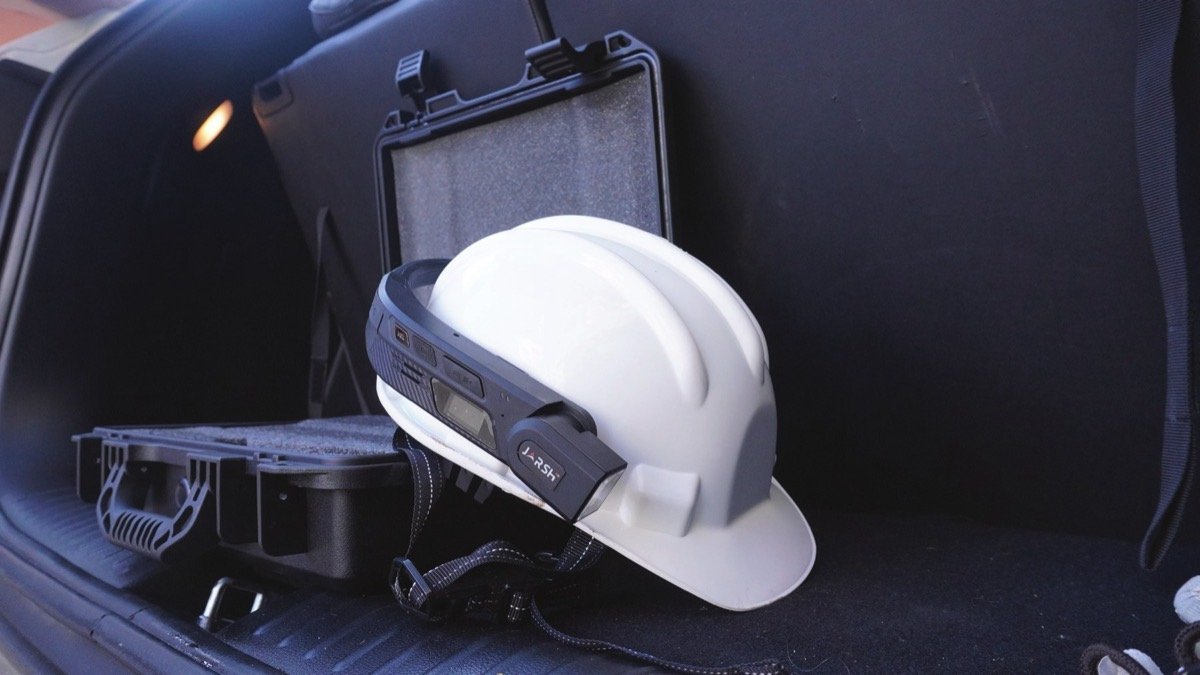
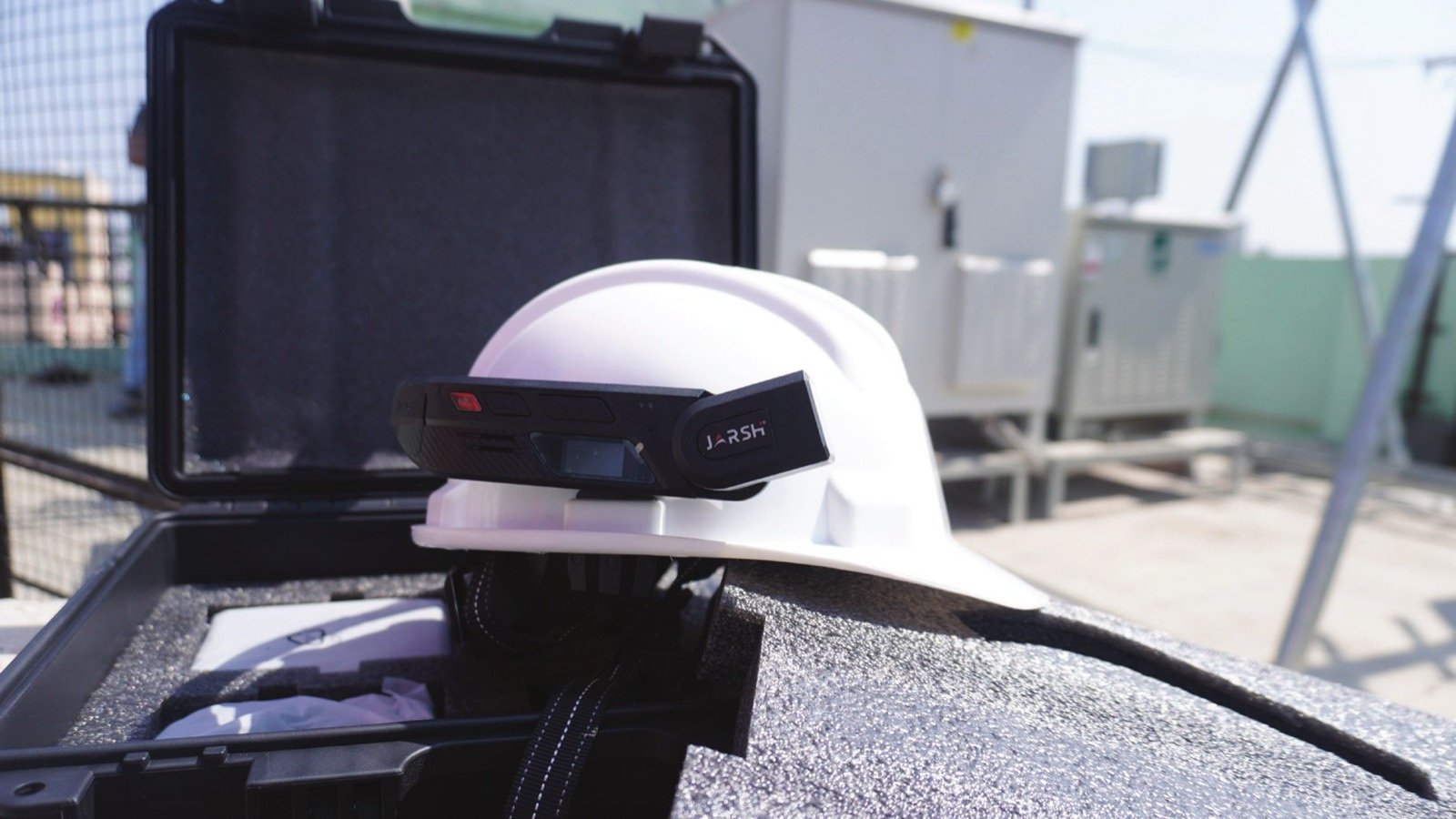
Jarsh WorkAlive camera unit mounted on a white industrial safety helmet at a substation
Live · console connected
TorchLaser4× zoomGPS
IPx6Ingress protection
2 mDrop rating
−20 to +55 °COperating temperature
285 gHelmet-mounted unit
Hot-swapBattery, no shutdown
4G + Wi-FiLTE · 2.4 / 5 GHz
The platform

One platform. Hardware and software, bought separately.

WorkAlive is two things: a helmet-mounted camera for the worker, and the software that turns its feed into guidance, evidence and inspection reports. Every software module works with the hardware — and with an Android smartphone.

HARDWARE · JWL-HMC

Jarsh WorkAlive™ unit

A ruggedised camera and compute unit that mounts onto the Industrial Helmet. The camera follows the worker's line of sight, both hands stay on the job, and the torch lights whatever they are looking at.

13 MP cameraRemote torchLaser pointerSOS keyHot-swap battery
SOFTWARE · LICENSED PER USER & MODULE

Connect · Assure · Enterprise

Three levels, each including everything in the one before. Start with live remote guidance, add recorded evidence with chain of custody, then run full remote inspections with signed, digitised reports.

L1 · ConnectL2 · AssureL3 · Enterprise

Worker-end: WorkAlive hardware

Hands-free work, hazardous and outdoor environments, long shifts, and sites where a personal phone is not permitted or not rugged enough.

Worker-end: Android smartphone

Supervisors, inspectors, pilot deployments, occasional users, and sites where issuing dedicated hardware is not justified.

Get the WorkAlive app onGoogle Play

Mix both on one account. Licences follow the user and the module, not the hardware — so a site can issue WorkAlive units to its line crews and let supervisors use their phones. At the expert's end, all you need is a modern web browser.

How it works

Connect · included in every level
WorkAliveworn by the field worker
video + audiotorch · laser · zoom
Jarsh CloudIndia region
live viewcontrols
Consoleremote expert, in the browser
Enterprise
Guest inspectorjoins by link, no account
Assure
Evidence Vaulttime-stamped, tamper-evident
Enterprise
Checklist engineaudit forms and reports

Connect — live video, audio, torch, laser, zoomAssure adds the Evidence VaultEnterprise adds the checklist engine and guest inspectors

Software modules

Three levels. Each one includes the last.

Compare all features →
Level 1 · Entry module

WorkAlive™ Connect

JWL-C1 · Live remote guidance

See what your crew sees, right now.

A remote expert sees the live feed, lights the work, points the laser at the exact component and talks the job through. Nothing is recorded, nothing is stored.

The entry point to the platform

  • Live two-way video and audio
  • Remote torch, laser and 4× zoom
  • Live GPS position and SOS alert
  • Session log (metadata only)
1Expert seat
250 hStreaming / licence / year
Explore Connect →
Level 2

WorkAlive™ Assure

JSWL-A1 · Recorded evidence

If it wasn't recorded, it didn't happen.

Recording that holds up when it matters — stamped with device time, server time and GPS, held in storage that cannot be altered, with a complete chain of custody.

Everything in Connect, plus

  • Cloud recording from the console
  • Tamper-evident storage, logged deletions
  • Full-resolution snapshots
  • Timecoded comments, tags and search
30 GBStorage / licence
250 hStreaming / licence / year
Explore Assure →
Level 3

WorkAlive™ Enterprise

JWL-E1 · Remote inspection

Every inspection ends in a signed report.

Your checklists and SOPs run in the console. Evidence attaches to the checkpoint it belongs to, failures raise a non-conformance, and the report is signed and hashed as the job closes.

Everything in Connect and Assure, plus

  • Checklists, SOPs and template versioning
  • Non-conformance workflow and e-signature
  • Guest seat for vendors and inspectors
  • Evidence export, dashboards, API
75 GBStorage / licence
1 + 1Expert + guest seat
Explore Enterprise →
Level 1 · Entry module

WorkAlive™ ConnectJWL-C1 · Live remote guidance

See what your crew sees, right now.

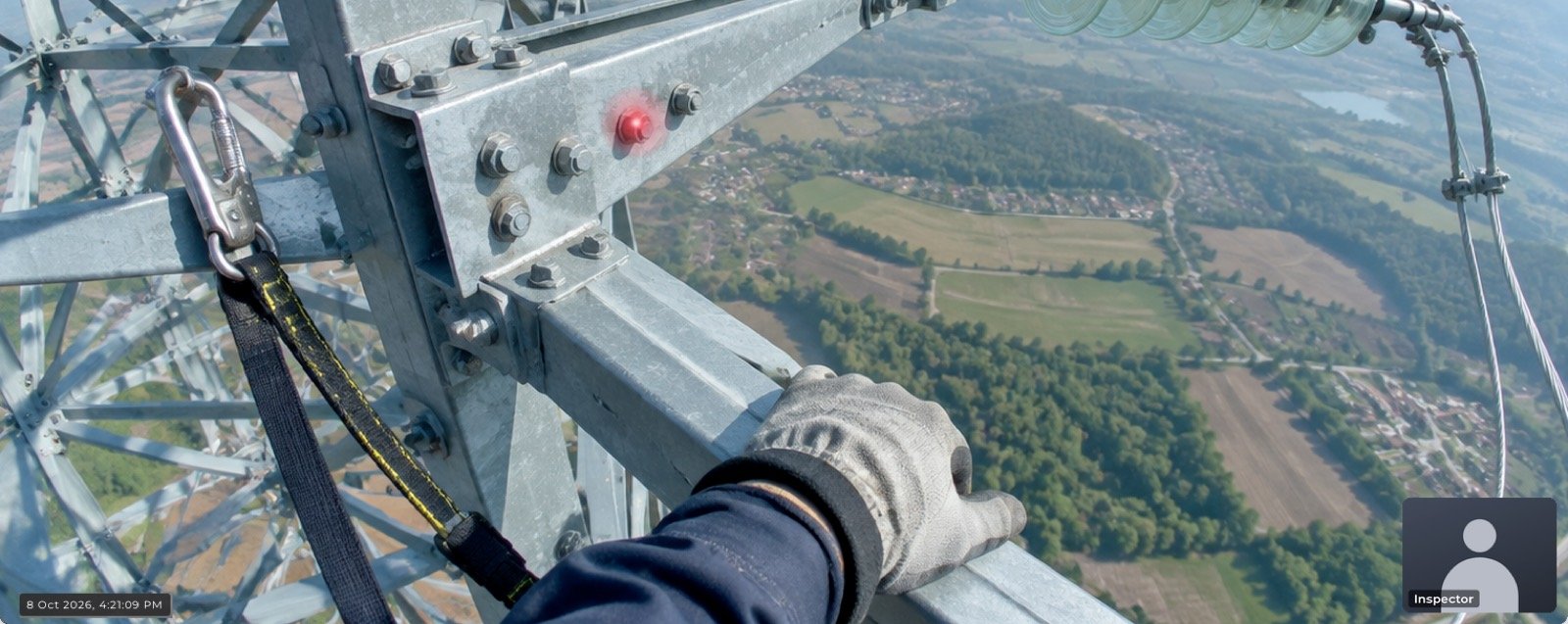
Connect puts a remote expert inside the job. The worker keeps both hands free; the expert sees the live feed, switches the torch on from the console, points the laser at the exact component in question, and talks the work through as it happens.

Live WorkAlive feed from a transmission tower with the laser pointer marking a bolt
Live console view · laser on target
< 1.5 sTypical glass-to-glass latency on 4G
1 MbpsMinimum upstream for 720p at 15 fps
30 sSession resumes after network loss
4×Digital zoom, driven from the console

Capabilities

Live two-way video and audio

Full-duplex call between the field device and the console.

Remote torch control

The expert lights the work area from the console; the worker keeps both hands free.

Remote laser pointing

Indicate the exact bolt, terminal or seam instead of describing it.

Remote camera control

Digital zoom and resolution stepping, driven from the console.

Live GPS position

Where the device is, updated through the session.

SOS key

A hardware key raises an alert to the console from anywhere on site.

Hands-free operation

Noise-suppressed audio designed for plant and outdoor environments.

Session log

Who called, who joined, how long. Metadata only; no media is retained.

Volume, headphones, network

Volume set at both ends; Bluetooth or wired headphones; Wi-Fi or 4G LTE.

Where it is used

ApplicationTypical ownerIndustries
Remote OEM breakdown supportMaintenance HeadPower, steel, cement, chemicals, pharma
One supervisor across several gangsDivision EngineerPower distribution, construction, EPC
Go / no-go decision without travelPlant HeadAll
Guidance for a junior technicianMaintenance LeadAll
First eyes on an emergencyControl roomPower, mining, oil and gas
Remote commissioning witnessProjects EngineerEPC, manufacturing
Need a record? Recording, snapshots, tags and comments, the evidence vault and chain of custody are in Assure.Go to Assure →
Level 2 · Includes Connect

WorkAlive™ AssureJSWL-A1 · Recorded evidence with chain of custody

If it wasn't recorded, it didn't happen.

Assure adds recording that will hold up when it matters. Every clip is stamped with device time, server time and GPS position, and held in storage that cannot be altered — with a complete chain of custody.

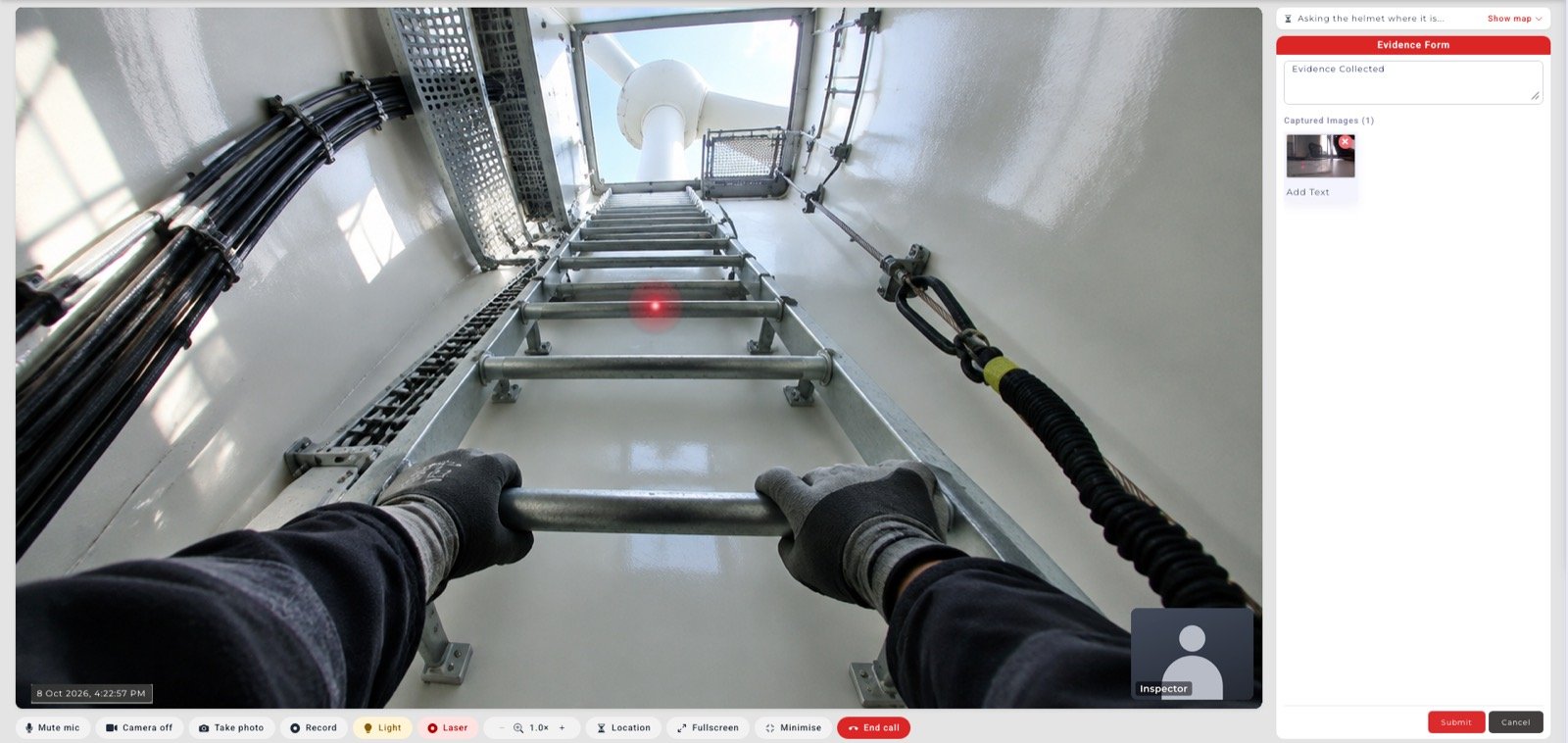
WorkAlive console recording a worker climbing a wind turbine tower ladder, with an evidence form alongside
Recording · evidence form
2 clocksDevice and server time recorded separately
GPS × 2Position at start and end of every capture
H.265720p at 15 fps, hardware encoded
30 GBCloud storage per licence

Capabilities

Cloud recording

Record the live session to the cloud from the console.

Storage that cannot be altered

Recordings cannot be edited once captured, and every deletion is logged.

Dual-clock and GPS stamping

Device time and server time both recorded, with position at the start and end of every capture.

Full-resolution snapshots

Capture stills during a live call without interrupting it.

Timecoded comments

Threaded notes anchored to a point in the recording.

Tag and search

Filter by tag, operator, site, asset or date across the whole library.

Chain of custody

Full audit trail of who viewed, commented on or exported each item.

Where it is used

ApplicationTypical ownerIndustries
Permit-to-work close-out proofEHS ManagerAll
LOTO and isolation verificationElectrical SupervisorPower, process, manufacturing
Incident scene documentationEHS and LegalAll
Near-miss and safety observationSafety OfficerAll
Contractor work verification for billingProjects / ContractsConstruction, EPC
Insurance claim substantiationRisk and FinanceAll
Toolbox talk attendance recordSafety OfficerAll
Training library built from live sessionsL&D / TrainingAll
Running inspections? Checklists and SOPs, evidence bound to checkpoints, digitised reports, e-signature, export bundles, guest seats and API access are in Enterprise.Go to Enterprise →
Level 3 · Includes Connect and Assure

WorkAlive™ EnterpriseJWL-E1 · Remote inspection with digitised reports

Every inspection ends in a signed report.

Enterprise turns the camera into an inspection system. Your checklists and SOPs run in the console, the inspector steps through each checkpoint, and the evidence captured in the field attaches to the checkpoint it belongs to. Failures raise a non-conformance with an owner and a due date.

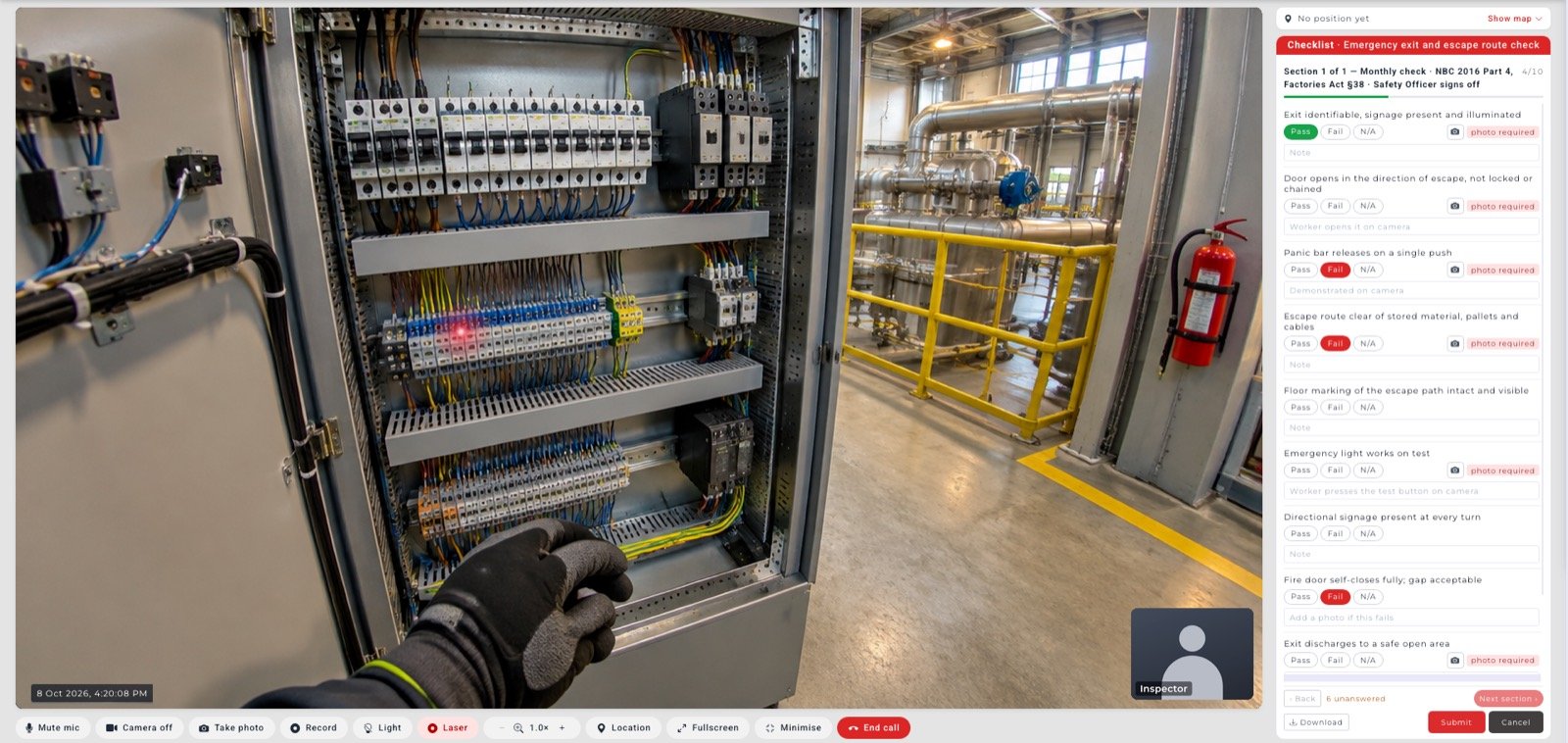
WorkAlive Enterprise console showing a live view of an electrical panel next to an inspection checklist
Checklist running in the console

Remote inspection replaces the travel, not the inspector.

The checklist does not run on the worker's device. It runs in the console, driven by the inspector — the worker is the eyes and the hands. The competent person still steps through every checkpoint and still signs the report.

100Ordered checkpoints per template
4Response types: pass/fail/NA, numeric, text, select
HashedDeterministic PDF — identical input, identical hash
75 GBCloud storage per licence

Capabilities

Checklists and SOPs

Ordered checkpoints with four response types and per-point evidence requirements.

Evidence bound to checkpoints

A photo is not a loose file. It is attached to checkpoint 7.

Template versioning

A completed job always renders against the template version used on the day.

Non-conformance workflow

Severity, owner, due date and closure evidence, tracked to close.

E-signature at close

Signer identity, timestamp and IP captured with the signature.

Digitised report

Generated server-side, reproducible, hashed and retained as an evidence object — with your logo and header.

Guest and external seats

Bring a vendor, third-party inspector or insurer into a single scoped job.

Evidence export bundle

Export a verifiable package of media, manifest, hashes and audit trail.

Dashboards, scheduling, API

Completion rates and open findings by age; recurring inspections; REST API and webhooks into your EHS or maintenance system.

Where it is used

ApplicationTypical ownerIndustries
Statutory and periodic safety inspectionsEHS ManagerAll
Vendor and pre-dispatch witness inspectionProcurement, QAManufacturing, EPC, power
Third-party inspection witnessQA / TPI agencyManufacturing, oil and gas
Shutdown and turnaround readinessMaintenance HeadProcess, power, steel
Asset condition surveyAsset ManagementPower distribution, utilities
Snagging and punch list close-outProjectsConstruction, EPC, real estate
Contractor competency check before entryEHS / ContractsAll
Supplier audit and ESG evidenceSustainability, SCMManufacturing, FMCG

Solution packs

Pre-built template and workflow sets for common inspection programmes, supplied configured against your own formats.

01Substation and line maintenance
02Confined space entry
03Work at height
04Shutdown and turnaround readiness
05Vendor and third-party inspection
06Contractor governance
Compare modules

What each level includes

All three modules run on WorkAlive hardware or an Android smartphone at the worker's end, and in any modern web browser at the expert's end.

Level 1 · Live remote guidance

  • Live two-way video and audio
  • Remote torch, laser pointer and zoom
  • Live GPS position and SOS alert
  • Session log
  • 1 expert seat · 250 streaming hours / licence / year

Level 2 · Everything in Connect, plus

  • Cloud recording
  • Tamper-evident storage and chain of custody
  • Dual-clock and GPS stamping
  • Snapshots, timecoded comments, tags and search
  • 30 GB cloud storage / licence

Level 3 · Everything in Assure, plus

  • Checklists, SOPs and template versioning
  • Evidence bound to checkpoints
  • Non-conformance workflow
  • E-signature and digitised, hashed report
  • Evidence export bundle
  • Dashboards, scheduling, REST API and webhooks
  • 1 guest seat · 75 GB cloud storage / licence
FeatureLevel 1ConnectLevel 2AssureLevel 3Enterprise
Live guidance
Live two-way video and audioIncludedIncludedIncluded
Remote torch, laser pointer and zoomIncludedIncludedIncluded
Live GPS position and SOS alertIncludedIncludedIncluded
Session logIncludedIncludedIncluded
Evidence
Cloud recordingNot includedIncludedIncluded
Tamper-evident storage and chain of custodyNot includedIncludedIncluded
Dual-clock and GPS stampingNot includedIncludedIncluded
Snapshots, timecoded comments, tags and searchNot includedIncludedIncluded
Inspection
Checklists, SOPs and template versioningNot includedNot includedIncluded
Evidence bound to checkpointsNot includedNot includedIncluded
Non-conformance workflowNot includedNot includedIncluded
E-signature and digitised, hashed reportNot includedNot includedIncluded
Evidence export bundleNot includedNot includedIncluded
Dashboards and schedulingNot includedNot includedIncluded
REST API and webhooksNot includedNot includedIncluded
What is included
Expert seats111
Guest seatsNot availableNot available1
Streaming hours250 / licence / year250 / licence / year250 / licence / year
Cloud storageNot applicable30 GB / licence75 GB / licence
Hardware unit · JWL-HMC

The worker's eyes, mounted where they are already looking.

A phone has to be held, which means a worker at height, inside a panel or on a ladder has to stop working to show you anything. A chest camera points where the body points, not where the eyes point.

Mounting on the helmet solves both. The camera follows the head, both hands stay on the job, and the torch lights whatever the worker is looking at. For a remote expert, that is the difference between watching a video call and being present.

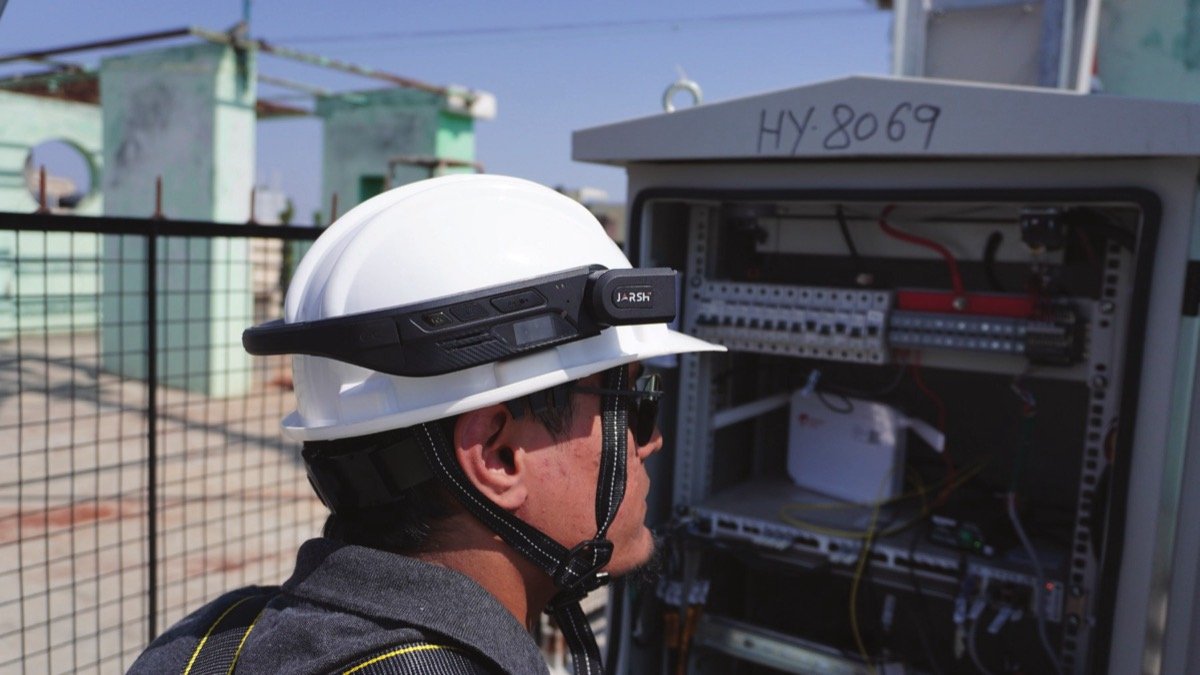
Worker wearing WorkAlive on a helmet while working hands-free inside an electrical panel
Both hands on the job
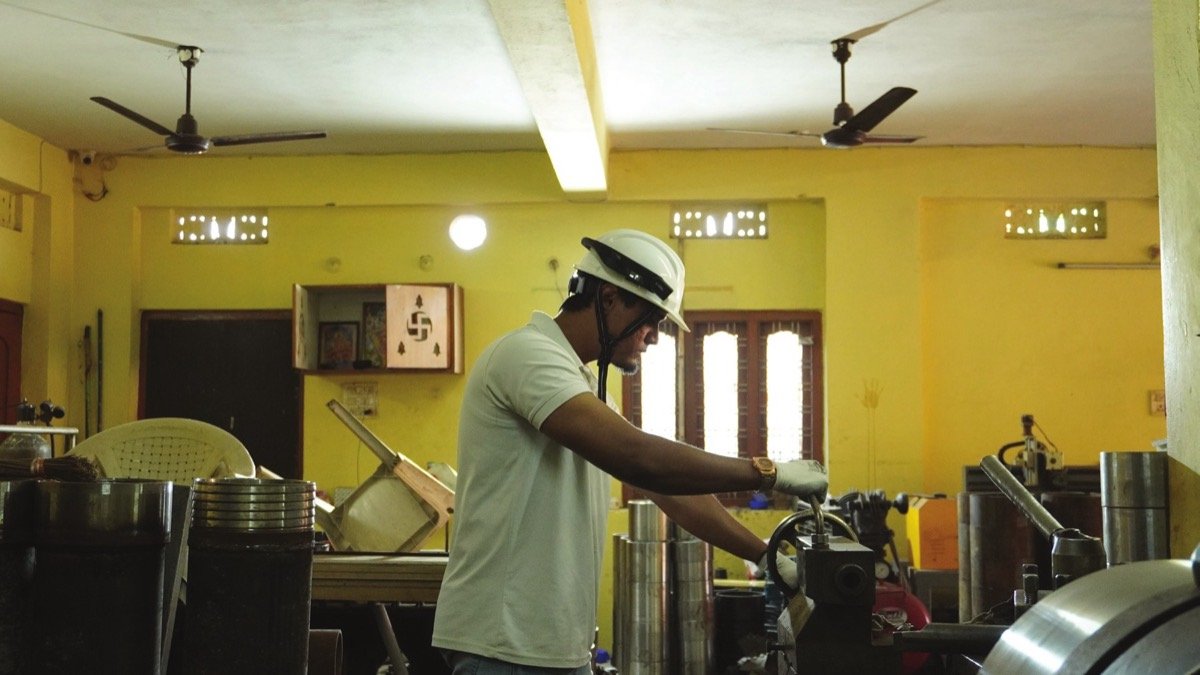
Technician wearing a WorkAlive-equipped helmet while operating workshop machinery
Camera follows line of sight

Hardware capabilities

Hands-free live view

Follows the worker's line of sight. No holding, no propping.

Remote-controlled torch

Panels, cable trenches and vessel interiors stop being a problem.

Remote laser pointer

Indicate the exact terminal, bolt or weld instead of describing it.

13 MP still capture

Full-resolution stills pulled during a live session without interrupting it.

Hardware video encoding

H.264 / H.265 on-chip, so streaming does not load the processor or drain the battery.

Offline capture

Records to local storage with no network and uploads when the link returns.

GPS positioning

Device location recorded with each session and capture.

Dedicated SOS key

A hardware key raises an alert to the console.

Hot-swappable battery

Exchange a depleted battery without shutting the device down.

Adjustable volume

Set on the device and from the console.

Headphone connectivity

Bluetooth headphones or wired headphones.

Wi-Fi and 4G LTE

Wi-Fi 2.4 / 5 GHz or 4G LTE.

Hot-swap, explained

A full-shift device, not a four-hour one.

A standard shift runs eight to twelve hours; one battery runs up to four. The unit holds enough reserve power to stay alive while the battery is out — so the worker ejects the depleted pack, clips in a charged one and carries on. No shutdown, no reboot, no sign-in, and nothing in the upload queue is lost.

Issue two charged spares per unit and a multi-bay dock, and the hardware covers a twelve-hour shift continuously.

0 h4 h8 h12 h
Battery 1
Battery 2
Battery 3
↑ swap · stays on↑ swap · stays on
Without hot-swap
power down
reboot
sign back in

Three or four times a shift — and whatever was in progress has to be rejoined.

WorkAlive unit fitted to an industrial helmet beside its rugged carry case
In the box

Ships with

  • 01Jarsh WorkAlive unit
  • 02Industrial Helmet mount
  • 03One battery
  • 04Charger

Charge with a single charger or a multi-bay dock. Software modules are licensed separately.

WorkAlive hardware or a smartphone?

Only on WorkAlive hardware

  • Hands-free, helmet-mounted
  • Camera follows line of sight
  • Remote torch and laser pointer
  • IPx6, 2 m drop, −20 to +55 °C
  • Full shift with hot-swap battery
  • Dedicated SOS key

Suits line crews, confined space, work at height, outdoor and hazardous areas.

Both

  • Live video and audio
  • Recording and evidence capture

A smartphone suits supervisors, inspectors, pilots and occasional users.

WorkAlive hardwareAndroid smartphone
Hands freeYes, helmet-mountedNo
Remote torch controlYesNo
Remote laser pointingYesNo
Camera follows line of sightYesNo
Rated for drops and waterIPx6, 2 m dropDepends on the handset
Operating temperature−20 °C to +55 °CDepends on the handset
Full-shift operationYes, with hot-swapDepends on the handset
Dedicated SOS keyYesOn-screen only
Live video and audioYesYes
Recording and evidence captureYesYes
SuitsLine crews, confined space, work at height, outdoor and hazardous areasSupervisors, inspectors, pilots, occasional users
Technical data

Specifications

Jarsh WorkAlive™ hardwareJWL-HMC

Compute and platform

Processor
MediaTek MT6765 (Helio P35), octa-core
Image signal processor
Integrated MediaTek Imagiq ISP, on-chip
Operating system
Android 8.1

Imaging

Camera
Single camera, 13 MP
Still resolution
4208 × 3120
Image sensor
Sony IMX258, 1/3.06 in
Sensor interface
4-lane MIPI
Autofocus
Phase-detect autofocus
Hardware video encoding
H.264 (AVC), H.265 (HEVC), MPEG-4, H.263
Video capture
Up to 720p at 15 fps, hardware encoded

Illumination and indication

Torch
High-output LED; switchable locally and from the console
Laser pointer
Class 2 visible indicator; switchable locally and from the console

Audio

Microphones
Dual microphone with noise suppression
Speaker
Integrated, full-duplex audio
Volume
Adjustable on the device and from the console
Headphones
Bluetooth and wired

Connectivity and positioning

Cellular
4G LTE
Wireless
Wi-Fi 2.4 / 5 GHz
Short range
Bluetooth
Positioning
GNSS (GPS) with assisted fix

Controls, display and storage

Display
0.96 in status display — status indication only, not for data entry
Dedicated keys
SOS key
Local storage
microSD, up to 128 GB, for offline buffering

Power

Battery
Removable, hot-swappable
Runtime
Up to 4 hours continuous on a single charge
Shift coverage
Extended by carrying charged spares
Charging
Single charger or multi-bay dock

Physical and environmental

Ingress protection
IPx6
Drop rating
2 m
Operating temperature
−20 °C to +55 °C
Weight
285 g
Mounting
Industrial Helmet mount
WorkAlive™ ConnectJWL-C1

Module specification

Video codec
H.264 / H.265, hardware encoded on WorkAlive hardware
Resolution
Up to 720p at 15 fps
Latency
Typically under 1.5 s glass-to-glass on a normal 4G link
Minimum upstream
1 Mbps for 720p at 15 fps
Audio
Full duplex with echo cancellation and dual-mic noise suppression
Remote commands
Torch, laser, digital zoom up to 4×, resolution step, mute
Command round-trip
Typically under 1.5 s on 4G
Reconnection
Session resumes within 30 s of network loss without starting a new session
Recording
Not available in Connect — see Assure

What is included

Expert seats
1
Guest seats
Not available
Streaming hours
250 hours per licence per year
Cloud recording
Not available
Storage
Not applicable
API access
Not available

Runs on

Worker's end
Jarsh WorkAlive hardware, or an Android smartphone
Expert's end
Any modern web browser
WorkAlive™ AssureJSWL-A1

Module specification

Recording codec
H.265 at 720p, 15 fps; hardware encoded on WorkAlive hardware
Timestamping
Device clock and server clock recorded separately on every item
Location
GPS fix recorded at start and end of each capture
Snapshots
Full sensor resolution, bound to the session in which it was taken
Comments
Threaded, anchored to a timecode

What is included

Expert seats
1
Guest seats
Not available
Streaming hours
250 hours per licence per year
Storage
30 GB per licence
Evidence export bundle
Available in Enterprise
API access
Not available

Runs on

Worker's end
Jarsh WorkAlive hardware, or an Android smartphone
Expert's end
Any modern web browser
WorkAlive™ EnterpriseJWL-E1

Module specification

Checklist structure
Linear ordered checkpoints, up to 100 per template
Response types
Pass / fail / NA, numeric, free text, single select
Evidence per checkpoint
Photo, video clip, or both
Mandatory evidence
Checkpoints flagged as requiring evidence block job completion
Template versioning
Completed jobs pinned to the template version in force at the time
Non-conformance
Severity, owner, due date, status, closure evidence
E-signature
Identity, timestamp and originating IP recorded
Report generation
Server-side PDF, deterministic; identical input yields an identical hash
Report branding
Customer logo and header on every report
Guest access
Scoped, expiring tokens; watermarked playback; download off by default
Integrations
REST API and outbound webhooks
Scheduling
Recurring inspections with assignment and overdue alerting

What is included

Expert seats
1
Guest seats
1
Streaming hours
250 hours per licence per year
Storage
75 GB per licence
Evidence export bundle
Included
API access
Included

Runs on

Worker's end
Jarsh WorkAlive hardware, or an Android smartphone
Inspector's end
Any modern web browser
Technical Data Sheet — Rev 01Hardware, Connect, Assure and Enterprise · issued 08 Oct 2026 · PDF
Download TDS
FAQ

Common questions

Can't find what you need? Call +91 8340 84 84 84 or write to info@jarshsafety.com.

Do I have to buy WorkAlive hardware to use the software?
No. Connect, Assure and Enterprise run on the Jarsh WorkAlive helmet-mounted unit or on an Android smartphone at the worker's end, and in any modern web browser at the expert's end. The hardware adds hands-free operation, remote torch and laser control, a dedicated SOS key and rated ruggedness.
Can one site use both WorkAlive units and phones?
Yes. Licences follow the user and the module, not the hardware — so line crews can wear WorkAlive units while supervisors use their phones on the same account.
Is anything recorded in Connect?
No. Connect is live guidance only — nothing is recorded and nothing is stored. A session log keeps metadata (who called, who joined, how long). Recording, snapshots and the evidence vault come with Assure.
How long does the battery last?
Up to four hours of continuous use per battery. Because the battery is hot-swappable, the unit stays on while a depleted pack is exchanged. With two charged spares per unit and a multi-bay dock, it covers a twelve-hour shift continuously.
What happens if the network drops?
A live session resumes within 30 seconds of network loss without starting a new session. The hardware can also record to local storage (microSD, up to 128 GB) with no network and upload when the link returns.
Where is the data hosted?
Sessions run through Jarsh Cloud in the India region. In Assure and Enterprise, recordings are held in storage that cannot be altered, with every deletion logged and a full audit trail of who viewed, commented on or exported each item.
Does the inspection checklist run on the worker's device?
No — by design. In Enterprise the checklist runs in the console, driven by the inspector; the worker is the eyes and the hands. The competent person still steps through every checkpoint and signs the report.
Can an external inspector or vendor join a job?
Yes, with Enterprise. A guest joins by link with no account, scoped to a single job. Access uses expiring tokens, playback is watermarked and downloads are off by default.

Put a remote expert on your next job.

Tell us about your sites and inspection programmes. We'll show you WorkAlive live and help you choose between Connect, Assure and Enterprise — on WorkAlive hardware, smartphones, or both.

Partner Login